
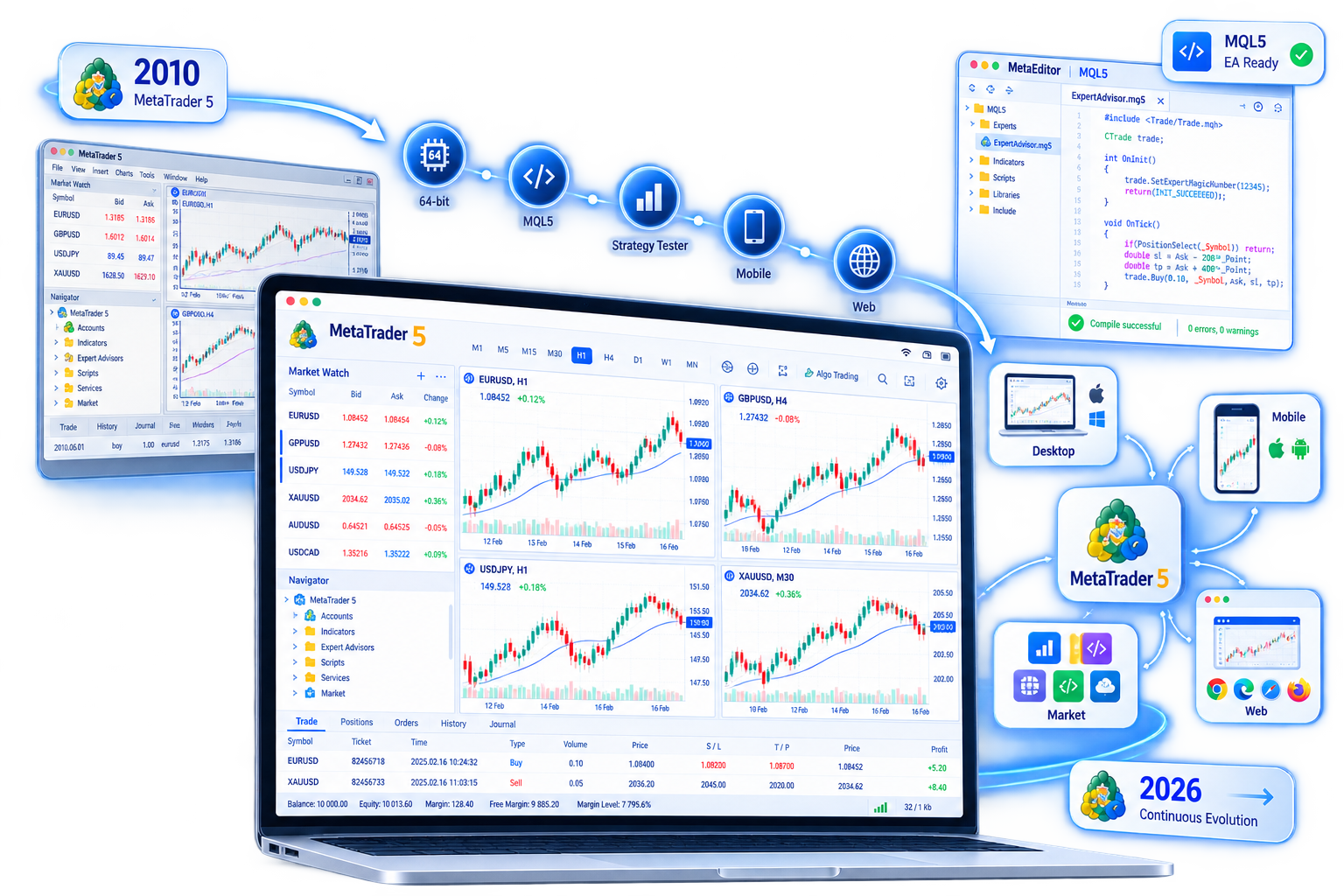
2010: The birth of MetaTrader 5
In 2010, MetaQuotes released MetaTrader 5 as the next-generation terminal after MetaTrader 4. The design was not limited to forex spread trading: stocks, futures, indices, and more were meant to live in one desktop workspace, with the new MQL5 language supporting fuller strategy development, backtesting, and optimization.
Compared with the previous generation, early MetaTrader 5 already stressed richer timeframes, finer order types, Depth of Market, and multi-threaded strategy testing. From the start it put execution and research in the same client: charts, positions, the tester, and the editor work together rather than as disconnected modules.
MetaTrader 5 has always been platform software, not a brokerage. After download and install, you still need an account and server issued by a broker to connect to live or demo trading.
2010–2026 product timeline
The stages below outline how platform capabilities rolled out. Exact build numbers and release dates change with official updates; the focus here is the product direction users can see.
-
2010
Platform launch
The desktop terminal and MQL5 appeared, establishing the architecture for multi-asset trading, algorithms, and professional chart analysis.
-
2011–2014
Ecosystem takes shape
MetaTrader Market, Signals, the Code Base, and a more complete testing workflow became part of daily use. The terminal grew from standalone software into a platform for indicators, EAs, and copy-trading services.
-
2015–2018
Trading modes and multi-terminal coverage
Hedging and related modes were added to align with different market rules. iOS, Android, and Web terminals improved, making on-the-go quotes and temporary login routine. Economic calendar, news, and Depth of Market became more common in the workspace.
-
2019–2022
Research tools and integration
Testing, optimization, and visualization were refined. On the development side, links to Python and other external tools helped connect research outside the terminal. Security, interface, and performance updates became more frequent.
-
2023–2026
Stable operation and ongoing builds
Emphasis shifted toward builds, compatibility, defect fixes, and consistency across terminals. Windows / macOS desktop, mobile apps, and WebTerminal continue in parallel so the 2010 architecture still serves daily trading and research.
Major versions and feature evolution
MetaTrader 5 rarely “rebrands” a generation. Capabilities accumulate under the same name through builds. For users, several work-oriented threads stand out:
- Trading system: From basic market and pending orders to fuller stop loss, take profit, trailing stop, partial close, and netting or hedging modes when the broker supports them; Depth of Market on instruments that provide it.
- Technical analysis: Built-in timeframes, indicators, and drawing objects, with multi-chart layouts; custom indicators and templates make workspaces reusable.
- Fundamentals: Economic calendar and financial news inside the terminal so macro events and chart work can be planned together.
- Algorithms and ecosystem: MQL5, MetaEditor, and the Strategy Tester form a development loop; Market offers indicators, EAs, and scripts; Signals support subscribing to or sharing ideas (past results do not indicate future outcomes).
- Access: Desktop carries full analysis and backtesting; mobile focuses on quotes, orders, and account monitoring; WebTerminal needs no install for temporary environments.
Each thread reached today’s form through many builds. Mobile and Web did not launch at today’s completeness; hedging, the store, and signals were filled in over years after the platform shipped. For MetaTrader 5, a “version” usually means layered capabilities—not a new product name every few years.
Ongoing fixes and stability
A trading terminal must run for long sessions, handle live quotes, and execute orders. Stability and security updates matter as much as features. MetaTrader 5 ships regular builds to fix issues, adapt to new operating systems, and adjust how it connects to broker servers.
In practice: keep watching official or broker update notices after install; Windows, macOS, app stores, and Web may follow different fix cadences; problems in third-party indicators or EAs are not the same as a platform fault. Official packages and timely updates help reduce compatibility and security risk.
Stability work rarely appears on feature posters, yet it decides whether charts stutter, tests reproduce, and mobile alerts arrive on time. The product’s life since 2010 rests heavily on this less visible maintenance, not a one-time launch.
MetaTrader 5 today
Today MetaTrader 5 is a set of trading and analysis tools you pick by device: Windows and macOS offer the fullest desktop workspace; iPhone, iPad, and Android cover time away from the desk; WebTerminal handles common charting and trading in the browser. Features include order and position management, multi-timeframe charts, fundamental feeds, EAs and strategy testing, and Market extensions.
It is still not a broker and does not create a tradable account on install. You choose a broker, obtain an account and server name, then log in. Instruments, leverage, fees, and position rules follow the broker’s disclosure. This site only introduces the product and download options.
From the 2010 desktop launch to a still-updating multi-terminal form in 2026, MetaTrader 5 has followed “one platform, continuous builds.” When you are ready, go to the download page and choose Windows, macOS, a mobile app, or WebTerminal for your device.